

How To Use The MDH-A12 Glucose Monitor
To check your blood glucose with the Medihands MDH-A12, wash your hands, take a blood sample from your fingertip with the lancing pen, touch the blood to an MDH-A01 test strip in the monitor, and read your result after 5 seconds. This guide is for people with diabetes who check their glucose at home, and follows the instruction manual.
What You Need
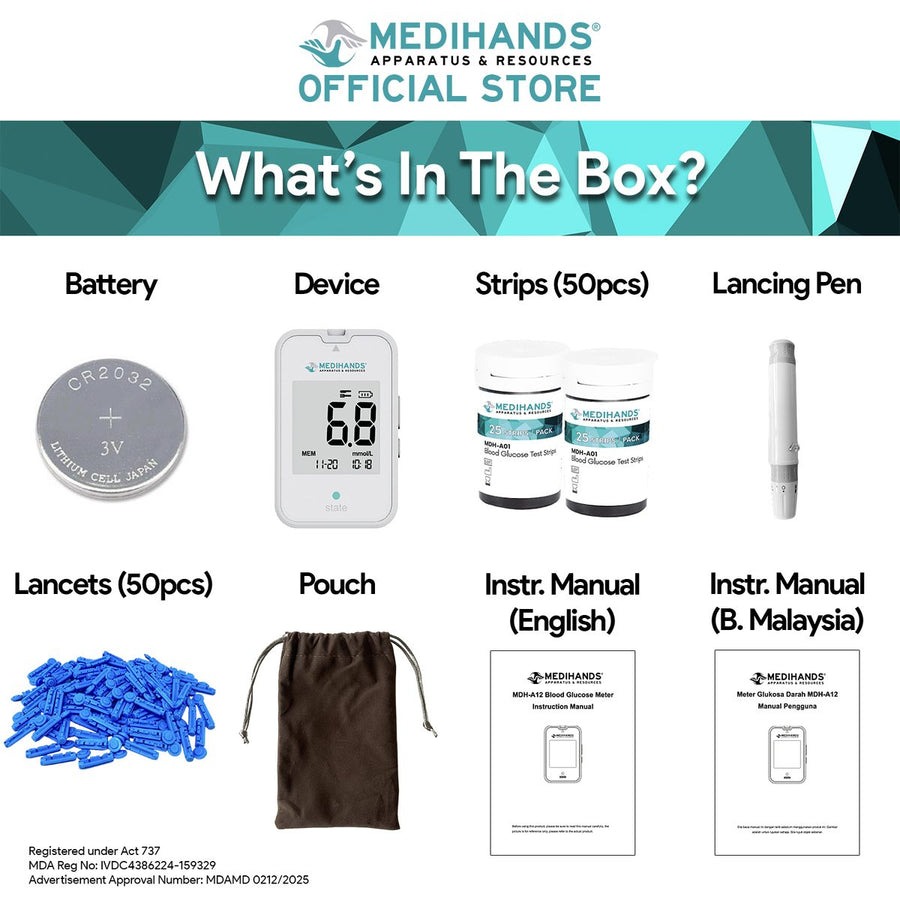
- The MDH-A12 monitor, with its battery fitted (one 3 V coin cell, CR2032)
- MDH-A01 test strips (the MDH-A12 uses these strips only)
- The lancing pen and a new lancet
- 75% medical alcohol and soap or warm water
- A container for used lancets and strips
- A place to record your results
Important Before You Start
- Use the monitor under the guidance of your healthcare professional. Do not stop or change your diabetes treatment based only on a reading from this monitor.
- It is not for diagnosing diabetes, and not for use on newborns.
- Use only the test strips made for this monitor. Do not use a strip that has expired, been used, or got wet.
- Do not share your lancing pen or lancets with anyone. Use a new lancet every time.
- Keep the monitor, battery, strips and lancets away from small children.
- Use the monitor at 5 to 40 °C and 10 to 80% relative humidity. Use strips at 10 to 35 °C and 80% relative humidity or less.
- Keep the monitor away from mobile phones, computers and induction cookers. Do not use it in a moving vehicle or in a noisy place.
Fit the Battery
- Remove the battery cover on the back of the monitor.
- Put in the coin cell battery with the positive and negative sides the right way round.
- Put the cover back. The monitor turns on and shows a full screen for about 2 seconds.
If the display shows E-b, the battery is low: replace it. Take the battery out if you will not use the monitor for a long time.
Set the Time and Unit
- With the monitor on standby, hold the M button for 3 seconds to enter the setup mode.
- The setting order is year, month, day, hour, minute, unit, then clearing the history. Press C to change the flashing number and M to move on.
- When the unit flashes, press C to switch between mmol/L and mg/dL, press M to confirm.
- At the clearing screen ("dEL"), hold M to delete all stored results, or press M briefly to skip it. The monitor then saves your settings and switches off.
Take a Reading
- Wash your hands with soap or warm water. Wipe the fingertip with 75% medical alcohol and let it dry completely.
- Prepare the lancing pen. Twist off the head, fit a new lancet, remove the lancet's safety cap, and twist the head back on tight. Turn the depth dial to suit your skin.
- Take a strip out of the bottle and close the bottle tightly straight away. Use the strip immediately.
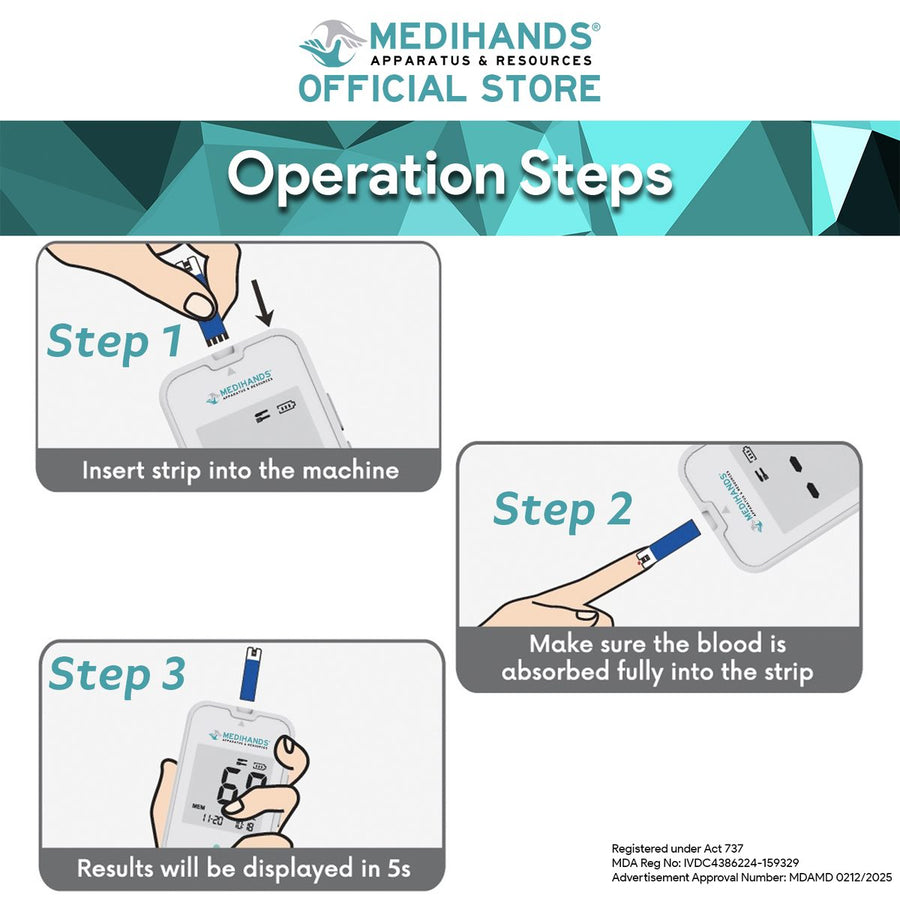
- Insert the strip with the electrical end facing up into the strip slot. The monitor turns on.
- Wait for the blood drop symbol to flash on the screen. You can press C to mark the reading as before or after a meal.
- Take the blood sample. Press the lancing pen against the side of your fingertip and press the button. To get a good drop, lower your hand to waist height and gently massage your finger from the palm towards the fingertip. Wipe away the first drop of blood and gently squeeze out a second drop. Do not squeeze too hard.
- Touch the blood to the end of the strip. The strip draws in the blood by itself. Make sure the blood is absorbed fully. If there is not enough blood, throw the strip away and start again with a new one.
- Wait for the countdown. The monitor counts down and then shows your result after 5 seconds. Do not remove the strip during the countdown, or the test is cancelled and the result is not saved.
- Finish. Remove the lancet from the pen and throw it away safely in a container. Push the strip eject button to remove the used strip and throw it away. Never reuse a strip or lancet.
The monitor saves your result automatically and switches itself off after about a minute.
Look at Past Results
- With the monitor off or on standby, press C. Your latest result appears.
- Press M to see your 7-day average, press again for the 14-day average, and again for the 28-day average. Press M once more to go back to your latest result and then older results.
- Hold C to leave and switch off.
The monitor stores 512 results. "---" means there are no results yet.
If the Display Shows a Message
| Display | What it means | What to do |
|---|---|---|
| E-U | The strip has been used or got wet | Throw it away and use a new, dry strip |
| HI or LO | The result is outside the monitor's measuring range (1.1 to 33.3 mmol/L) | Test again. If it shows the same, contact your healthcare professional or us |
| E-b | Battery is low | Replace the battery |
| E-0 | Temperature is outside the working range | Move to a room at 5 to 40 °C |
| Monitor does not start | Strip not inserted properly, damaged strip, battery low or wrong way round | Check the strip and battery, or call customer service |
Your Results
Keep a log, and bring it to your doctor. Only your doctor can tell you what your results mean. Please consult your healthcare professional for the interpretation of result and diagnosis.
Care of Your Monitor
- Wipe the outside with a soft cloth dipped in water. Do not use other liquids, and do not let liquid or dirt get inside. Never put the monitor in any liquid.
- Do not take the monitor apart, repair it or change it yourself.
- When you carry it, keep it in its pouch or box to protect it from knocks and water.
- Throw away used lancets, strips and alcohol swabs safely, following local rules.
Common Questions
Which strips does it use?
MDH-A01 only. Which test strips fit my monitor? →
How many results does it store?
512, with 7-, 14- and 28-day averages.
What is in the box?
The monitor, 50 strips, 50 lancets, a lancing pen, a battery, a pouch and manuals in English and Bahasa Malaysia.
Is it registered?
Yes, with the Medical Device Authority (MDA), registration no. IVDC4386224-159329. Check it yourself →
Order online and we deliver to your door, with free shipping within West Malaysia. See the Glucose Monitor →
Please consult your healthcare professional for the interpretation of result and diagnosis. Medihands devices are for personal home use and do not replace advice from your doctor. Talk to your doctor about what your readings mean for you.
Last updated: November 2026